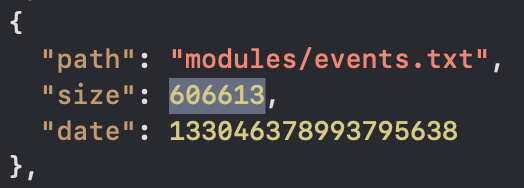
The latest model of our G1000 hardware is capable of controlling either our G1000 iPad app or the built-in G1000 in either X-Plane or MSFS/MSFS2024 with proper hardware/software configuration. While following the instructions on our download page, there are users reporting they cannot use the G1000 hardware to control the built-in G1000. This happens only with MSFS2024. The trick is in the file “layout.json” which is in “mobiflight-event-module” folder. Please open “layout.json”, modify “size” of “modules/events.txt” to the actual size of the file. For the “events.txt” downloaded from our website, the number should be 606613.
4 Comments
Leave a Comment
You must be logged in to post a comment.
I don’t know if this is related to this topic, but I am trying to use the G1000 hardware to monitor and control radio frequencies with the Contrail Falcon 50. I am using the aircraft’s autopilot to control the flight. As soon as I launch the G1000 bridge app, the altitude controller in the aircraft suddenly starts continuously changing the altitude target value down in 100 ft increments. So, the bridge app is conflicting with the aircraft, which means that I can’t use the G1000 hardware with this aircraft at all. This problem just started happening. Any ideas on what might be causing this, or how to fix it?
Are you using the app with MSFS? I don’t have Contrail Falcon 50. It should work as long as it works with the default Cessna. Can you provide more details or contact me at lichenpo@hotmail.com?
Hello Li Chen – you state “The latest model of our G1000 hardware is capable of controlling either our G1000 iPad app or the built-in G1000 in either X-Plane or MSFS/MSFS2024 with proper hardware/software configuration.”
Does the older G1000 hardware bezel also have this ability? Or only the new bezel that supports the newer iPad size?
Regards – Mike
I had the same question (you and I got the bezels around the same time several years ago, IIRC) and the answer from Li Chen was unfortunately no.